



Published: January 22, 2025
QuintoAndar significantly improved its web performance by reducing its Interaction to Next Paint (INP) by 80%, leading to a 36% increase in conversions year-over-year. Recognizing the importance of fast, responsive sites for user engagement, we implemented a "Code Yellow" to prioritize performance across all teams.
Using tools like Real User Monitoring (RUM) and techniques such as async/await for long task optimization and React transitions, QuintoAndar successfully reduced interaction times and improved the user experience. The changes—including removing third-party pixels and rendering optimizations,—resulted in better performance metrics, going from 42% to 78% of pages now meeting INP's "good" threshold of 200 milliseconds or less, and only 6.9% of pages offering a poor experience versus 32% when we started.
The problem
QuintoAndar is the largest housing platform in Brazil, with listings also active in several Latin American countries. Search is the largest online channel in real estate, this means that acquiring organic traffic is vital to its business. Additionally, providing an excellent user experience is crucial to keeping users engaged, helping users find their dream homes.
At the beginning of 2024, QuintoAndar realized that, while they likely had the best platform in the market, they could be delivering a better user experience leading to higher conversion rates. This became evident with the introduction of Interaction to Next Paint (INP) as a Core Web Vital, and, in fact, QuintoAndar had the worst INP compared to our competitors.
Aware of the negative impact of a high INP on user experience, QuintoAndar's SEO and Web Performance team decided to take action. With a well-defined action plan, they began working on a series of technical and content improvements aimed not only at reducing INP, but also at enhancing user engagement and click-through rates.
This is the story of how QuintoAndar managed to reduce INP by 80%, resulting in a significant increase in conversions and user experience improvements. In this case study, the strategies implemented, the challenges faced, and the results achieved will be explored.
Code Yellow: Prioritizing web performance
Aware that web performance is crucial not only for user experience but also for overall business success, and knowing that a fast and responsive site results leads to higher engagement and better user retention, QuintoAndar understood that achieving these results required a continuous and coordinated effort across the organization. This led to QuintoAndar instituting a "Code Yellow".
The concept of "Code Yellow" originated at Google as a response to the need for improved speed, granting a designated leader the authority to recruit anyone within the company to assist, regardless of their current projects.
At QuintoAndar, the "Code Yellow" acted as an internal alert system designed to prioritize web performance improvements within the organization. When the "Code Yellow" was declared, it triggered immediate and coordinated action from various teams within the company to address and resolve performance-related issues.
How QuintoAndar identified major opportunities and applied optimizations
Delays over 200 milliseconds are noticeable to users, and any significant lag beyond that impairs a good user experience. This is why the INP metric is so important: It assesses a page's overall responsiveness to user interactions by observing the latency of all click, tap, and keyboard interactions that occur throughout the page lifecycle.
However, improving this metric requires a deep dive into the details. For QuintoAndar, the first step was to identify which stages and elements of the user experience were responsible for slow interactions. This can be done using Real User Monitoring (RUM) techniques, which allow for detailed tracking of slow interactions. This includes breaking down the INP into sub-parts such as input delay, processing time, and presentation delay, as well as analyzing Long Animation Frames (LoAF).
Through this process, it was possible to identify, for example, that certain elements of the property search experience were causing a 4 second interaction time at the 75th percentile (affecting 25% of users). By optimizing long tasks, significant improvements were achieved in many slow interactions affecting INP. This was done by employing async/await to create yield points in QuintoAndar's JavaScript code:
function yieldToMain () {
  return new Promise(resolve => {
    setTimeout(resolve, 0);
  });
}
In this way, useful visual feedback for the user can occur more quickly. In QuintoAndar's case, a spinner was rendered, the main thread was yielded to for other possibly higher priority tasks, and then the rest of the work to be initially done could resume after yielding:
async function handleFilterClick () {
  showLoadingSpinner();
  await yieldToMain(); // Yield point
  await loadFilterData();
  showModal();
}
Another widely used technique—which is essential for those building applications with React—is the use of transitions. Since React now supports transitions, QuintoAndar could use the useTransition hook to update application state without blocking the user interface.
import React, { useState, useTransition } from 'react';

function App() {
    const [isPending, startTransition] = useTransition();
    const [value, setValue] = useState('');

    const onInputChange = event => {
      setValue(event.target.value) // high-priority

      startTransition(() => {
          // Time-consuming task—for example, filter and update the list...
      });
    }

    return (
      <div className="App">
        <input
          value={value}
          onChange={onInputChange}
          placeholder='Start typing...'
        />
      </div>
    );
}

export default App;
Along with the techniques mentioned, QuintoAndar implemented other improvements such as the use of memoization, debouncing, abort controllers, Suspense, resulting in improvements to INP.
For example, in the previous code example, debouncing could be applied, which is a technique that delays the execution of a function until a certain period of inactivity has passed. This helps prevent unnecessary updates when the user is typing quickly.
useEffect(() => {
  const handler = setTimeout(() => {
    setDebouncedValue(value);
  }, 300); // Adjust debounce delay as needed

  return () => clearTimeout(handler);
}, [value]);
In addition, the use of Total Blocking Time (TBT) as a proxy for INP enabled QuintoAndar to estimate the impact of big structural changes made, such as:
- Removing third-party pixels from the client.
- Eliminating CSS-in-JS.
- Rendering optimizations.
Initiatives like these are important, because they directly address input delay, which is the time between when the user begins an interaction, and when the event handlers registered for it begin to run. Input delays often increase when other tasks are running as the user begins an interaction with the page. For QuintoAndar, input delay was one of the major contributors to INP, due to the large number of tasks running on the main thread during the initial page load.
Web performance governance to prevent regressions
Prioritizing and solving performance issues isn't enough if regressions can't be prevented. When QuintoAndar faced regressions in the past, they recognized the importance of creating a robust governance mechanism to prevent their performance improvement efforts from regressing.
The first step was to establish alert mechanisms for each metric, segmented by application type or experience—or both. Through metric data captured from real users, QuintoAndar is able to monitor performance and send this data to a time-series database, where tools can be used to generate dashboards and segmented alarms.
In addition to fixed alarms, QuintoAndar also implemented alarms with variable thresholds that detect unusual outcomes to notify their development team when conditions are going out of control even before hitting the fixed threshold. QuintoAndar also established a bi-weekly committee to adjust the thresholds for these alarms.
To handle incidents, a process was created was strictly followed using runbooks, which detail the procedure to be followed for each type of issue that could come up. These runbooks can be followed by anyone in engineering.
Finally, to prevent INP issues from entering production, QuintoAndar implemented a canary release system that delivers a new release in stages to users (for example, incrementally from 1%, 10%, 65%, and finally to 100%). At each rebalancing stage, the canary version is checked to see whether it results in worse performance for the user. If so, a rollback automatically occurs, preventing unoptimized features from going fully into production.
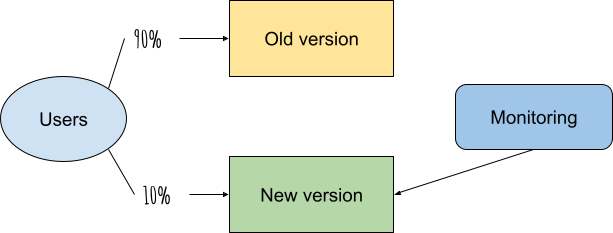
To review, the main actions taken were:
- Well-defined alerts (fixed and variable) with bi-weekly committees for threshold refinement.
- Incident procedures with detailed runbooks.
- Canary releases with performance validations to limit the impact of potential performance regressions.
Results
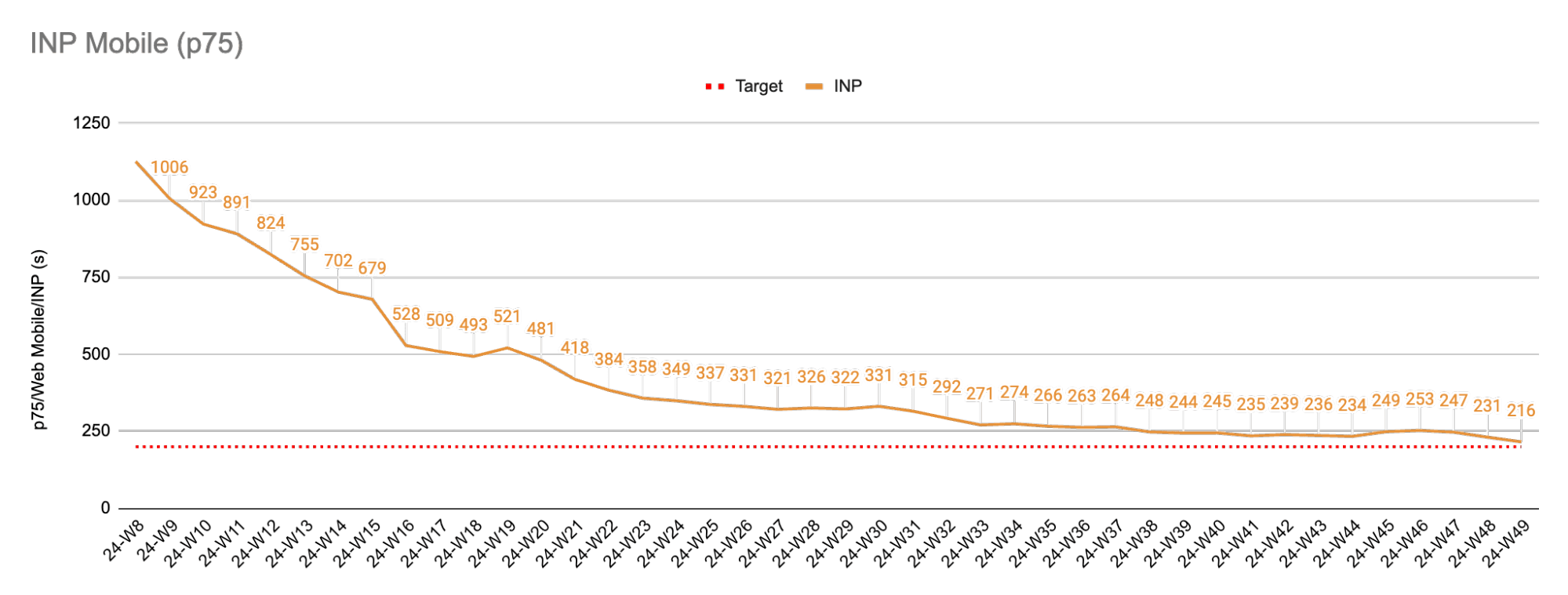
Proper prioritization of performance within the organization, a dedicated performance team, and the use of optimization techniques resulted in an 80% reduction in INP as measured in our RUM data. The chart below shows INP specifically for mobile, where an initial rapid decline can be seen. This improvement was driven by fixes for interactions that were particularly problematic. It also highlights a consistent drop that was maintained throughout the year, demonstrating the importance of the governance process in preventing regressions.
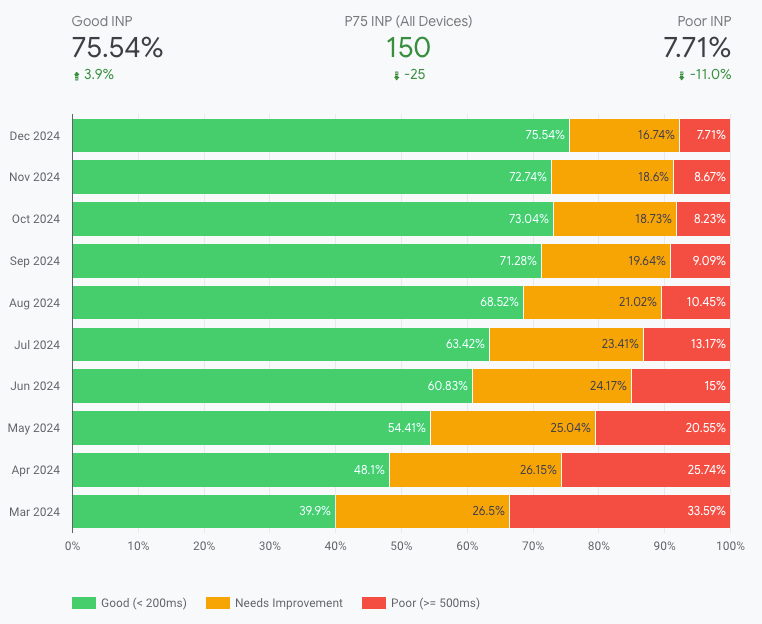
These improvements were also reflected in the CrUX Dashboard, where QuintoAndar now has an INP under 200 milliseconds at the 75th percentile, with 78% of its pages performing below this threshold, and only 6.9% of pages delivering a poor experience—a number that has been steadily decreasing month after month.
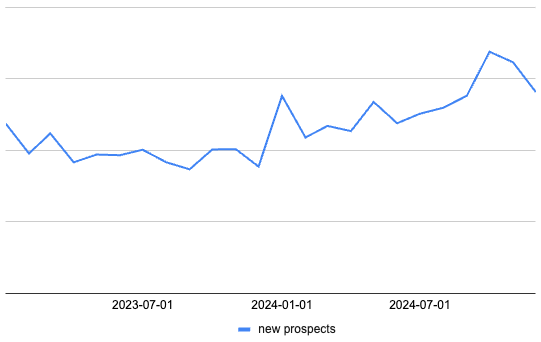
This result was crucial for having a direct impact on QuintoAndar's business. QuintoAndar observed that there was a 36% year-over-year increase in conversion volume (new prospects, which in the case of QuintoAndar are people who scheduled a property visit). This result is strongly—but not solely—linked to the improved engagement they achieved through delivering a better user experience.
Conclusion
Improving web performance is challenging. At times, it might even feel overwhelming. When QuintoAndar started, they didn't have all the answers. By breaking the problem down, however, and focusing on the highest-impact issues, and fostering collaboration across teams, they made real progress. Not everything needs to be fixed at once; even small, incremental changes can lead to meaningful improvements. By taking the first step, whether it's identifying your biggest bottlenecks, experimenting with optimizations, or building awareness within your team, you'll be on the path to better performance and a better user experience.